Google’s dedicated Generative AI report is now available worldwide, but the number it gives you is narrower than “AI visibility.” It reports impressions for links from your site in supported Google Search AI features. It does not rank citations inside an AI answer, reveal the buyer’s question, or prove that anyone visited the page.
That distinction matters now that more Canadian businesses can see the report. A large impression total can be useful evidence. It can also send a team in the wrong direction if it is added to the normal Search total, treated as an AI citation score, or presented as demand.
The news is wider access, not a new ranking system
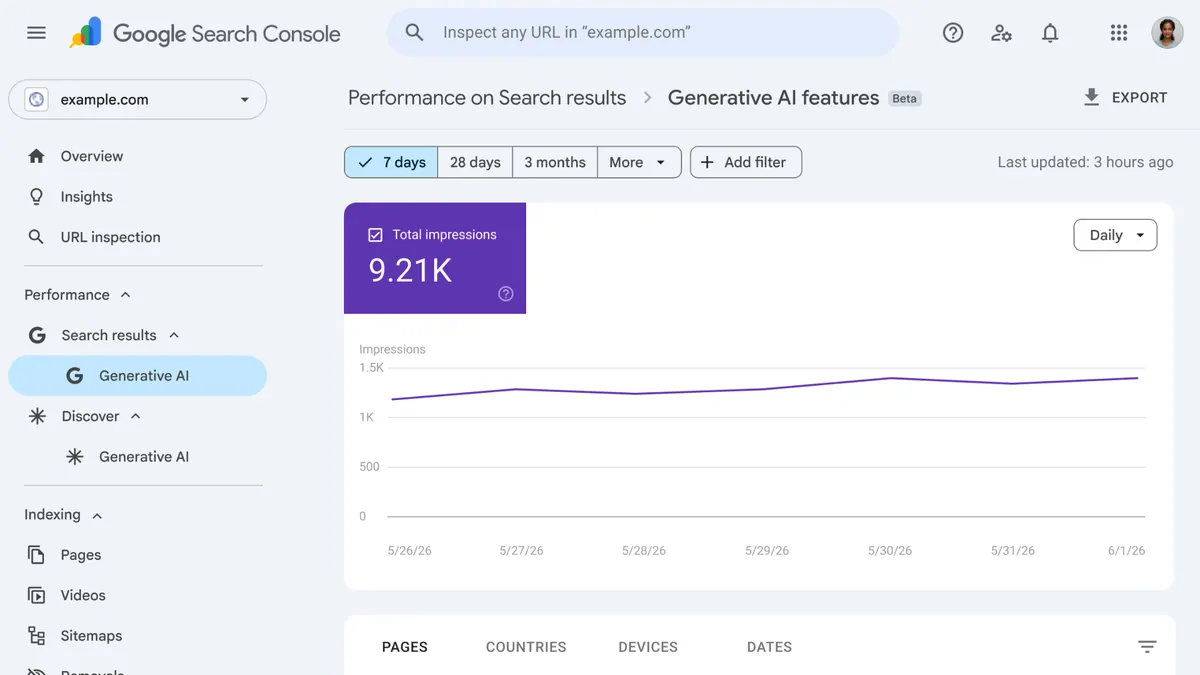
Google launched the report on June 3, 2026 and says the insights finished rolling out to all websites worldwide on August 31. The Search report covers AI Overviews and AI Mode. Its table can group data by page, country, date and device, while the chart shows property-level impressions.
This is a reporting change. Google did not announce a new optimization requirement or a public formula for ranking sources inside an answer. A Canadian site can use the country dimension to isolate Canadian impressions, but the rollout statement does not guarantee that every property will show a useful chart. Google notes that the report may be absent when a site has not received enough impressions or has been excluded from Search generative AI features.
Two Search Console views answer different questions
| Evidence surface | What it provides | What remains missing |
|---|---|---|
| Generative AI performance report | AI-feature impressions grouped by page, country, date or device. | Queries, clicks, CTR, average position and separate AI Overview versus AI Mode totals. |
| Standard Search performance report | Overall Web search clicks, impressions, CTR, position and query data, including AI-feature activity in the totals. | A clean filter that attributes each row to an AI Overview or AI Mode. |
| Dated answer sample | The wording, visible sources and accuracy of one result under recorded conditions. | A complete market share, stable rank or account-wide performance total. |
| Analytics and lead records | Measurable visits, contact actions, received enquiries and qualification decisions. | Proof that an AI impression caused the outcome. |
Because the Generative AI data is already included in the overall Search performance report, adding the two impression totals together would double count part of the same activity. Compare the views; do not sum them.
Average position does not rank citations inside an AI Overview
Google’s general position rules treat a compound search feature as one element. Its documentation now states the consequence directly: an AI Overview occupies one position, and every external link inside that overview receives the same position value.
If an AI Overview is recorded in position one, a page linked near the end of that overview can also receive position one in the standard Performance report. That number describes the containing search element. It does not mean the page was the first source, the most prominent citation, or the main evidence used to compose the answer.
AI Mode uses the usual Search position methodology as well. A follow-up in AI Mode is logged as a new query, but the dedicated Generative AI report still does not expose the query text. This is why average position can support trend review while remaining a poor proxy for citation placement.
An impression may represent an opportunity to see a link
Google applies its standard impression rules to AI Overviews and AI Mode. A link in the current result set can count without scrolling, but a link inside an independently expanding or scrolling element generally needs to become available or visible within that element. Read the relevant result-type rule rather than assuming every hidden source link counted.
The aggregation also changes what the totals look like. The chart is normally aggregated by property, so two links from the same site in one AI feature can count as one property impression. The page table is grouped by canonical URL and can show activity for more than one page. A chart total and the sum of page rows therefore need not match.
None of this establishes that the user read the cited passage, understood the brand, clicked, or became a lead. It establishes a documented opportunity for a link to be seen under Google’s reporting rules.
Build a baseline that survives the next interface change
We recommend keeping six fields together without collapsing them into one score:
- Report status: property, date checked, report available or unavailable, and any visible data warning.
- AI impression slice: total, page, country, device and comparison window from the dedicated report.
- Normal Search evidence: the same pages’ queries, clicks, impressions, CTR and average position from the standard report.
- Answer sample: exact buyer question, interface, date, language, location setting, mention, cited URL and description accuracy.
- Business action: measurable visit, received enquiry and manual qualification outcome, each kept separate.
- Change ledger: the page edit, internal link, profile correction or technical release that happened during the comparison window.
For a small business with little data, start with priority service and decision pages rather than every URL. A few impressions establish a baseline, not a verdict. Preserve the interface's missing-value state before exporting: Google says values displayed as ~ or - become zeros in the download. Those export zeros must not silently replace unavailable values in your report.
Google also recorded a reporting anomaly for August 13–17, 2026 that reduced Generative AI in Search impressions. Google says the missing data was restored on August 21. Keep the incident in the change ledger when comparing an export captured before the restoration; the temporary dip did not establish that rankings, demand or citations fell.
Turn the report into one owned decision
MAXUOD would first identify which visible page already owns the customer question. Then we would compare its AI impressions with standard Search evidence, inspect a small set of answers for source and description accuracy, and trace the page to the contact path. The deliverable is an ordered change with an owner and a review condition—not an “AI score.”
A team can do this itself when the property is small and the page owner is obvious. A focused review becomes useful when Search Console, answer samples and lead records disagree, or when several pages compete for the same service question. Private account data requires agreed access; a public-site audit cannot verify Search Console receipt or lead quality.
The operating default is simple: export a dated baseline, keep AI impressions inside their documented boundary, and change one priority page only when the combined evidence points to a real reader problem. More impressions are worth observing. They are not, by themselves, proof of better GEO, more trust or more revenue.
Sources and platform behaviour checked September 14, 2026. This article explains reporting methodology; it does not promise rankings, AI citations, traffic or enquiries. The cover is an official Google Search Console illustration used for editorial explanation.
Buyer questions
Why can’t I see the Generative AI report?
Google says the report may be absent when a property has not received enough impressions or has been excluded from Search generative AI features. Record it as unavailable rather than zero.
Can the report show which question triggered my page?
The dedicated report does not currently expose queries. Use standard Search query data and clearly labelled, dated answer samples without treating either as a complete prompt census.
Related reading and sources
Read next on MAXUOD
External references
Need the AI report turned into one useful decision?
MAXUOD can compare Search Console, answer samples, priority pages and the enquiry path, then define the smallest change worth implementing and measuring.